Adding too many experiments to a budget group limits daily budget per experiment and negatively affects campaign performance.
Calculate the number of experiments you can add to a budget group while maintaining a daily budget per experiment that meets our recommended thresholds.
Use the calculator
Manually calculate the number of experiments
- Log in to the metadata platform
- Click Campaigns on the left navigation
- Click Experiments in the upper navigation
- Select the budget group in the Budget Groups dropdown
-
Select Active in the Status dropdown (deselect other options)
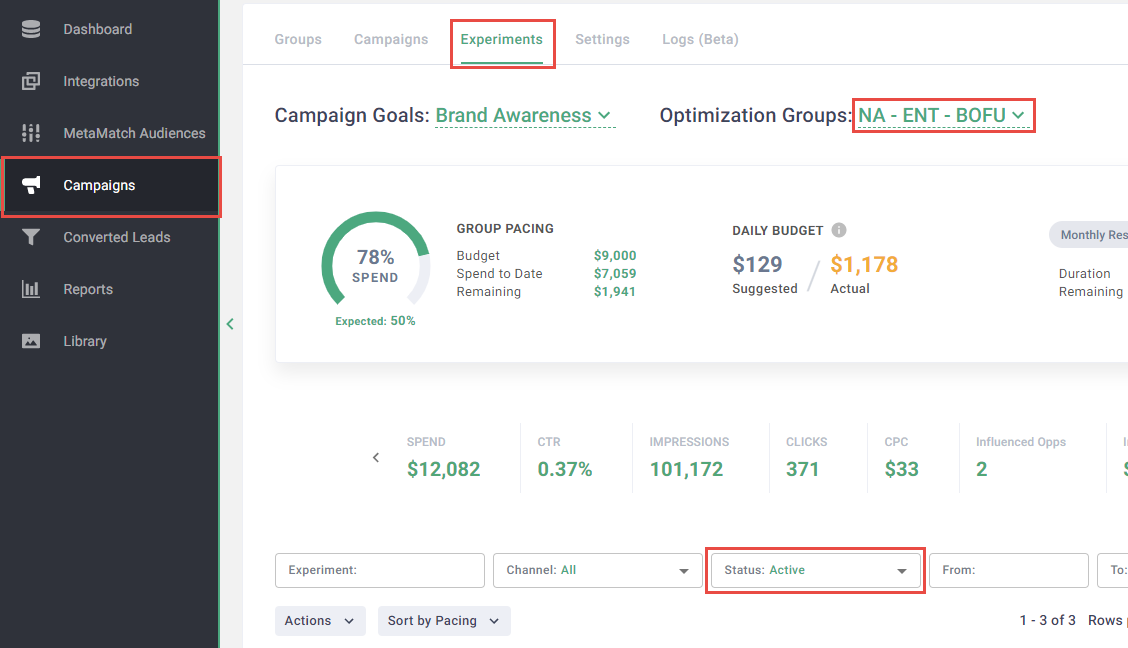
- Note the following:
- Suggested daily budget
- Current active experiments
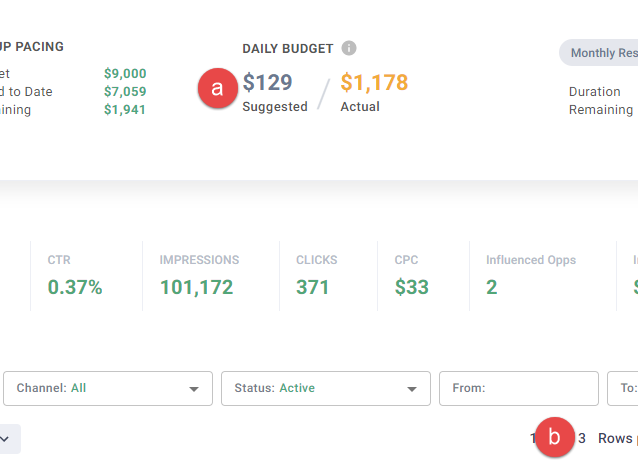
-
Calculate the number of experiments:
Note: Provide a daily budget of $50 - $100 per experiment for the best performance. Daily budgets less than $25 see a significant drop in performance.
Calculate for budget groups with no active experiments:
(suggested daily budget) / (daily budget per experiment) = (total active experiments)
Calculate for budget groups with active experiments:
Step One: Calculate the total active experiments
(suggested daily budget) / (daily budget per experiment) = (total active experiments)
Step Two: Calculate the active experiments you can add
(total active experiments) - (current active experiments) = (number of active experiments you can add)