Specifications:
- Supported file types: PDF
- Size limit: 100MB
- Page limit: 300 pages
-
Supported layouts:
- Letter: 8.5 by 11 inches
- Tabloid: 11 by 17 inches
- Legal: 8.5 by 14 inches
- Statement: 5.5 by 8.5 inches
- Executive: 7.25 by 10.5 inches
- Folio: 8.5 by 13 inches
- A3: 11.69 by 16.54 inches
- A4: 8.27 by 11.69 inches
- B4: 9.84 by 13.90 inches
- B5: 6.93 by 9.84 inches
Give target personas easy access to your content using Document Ads on LinkedIn.
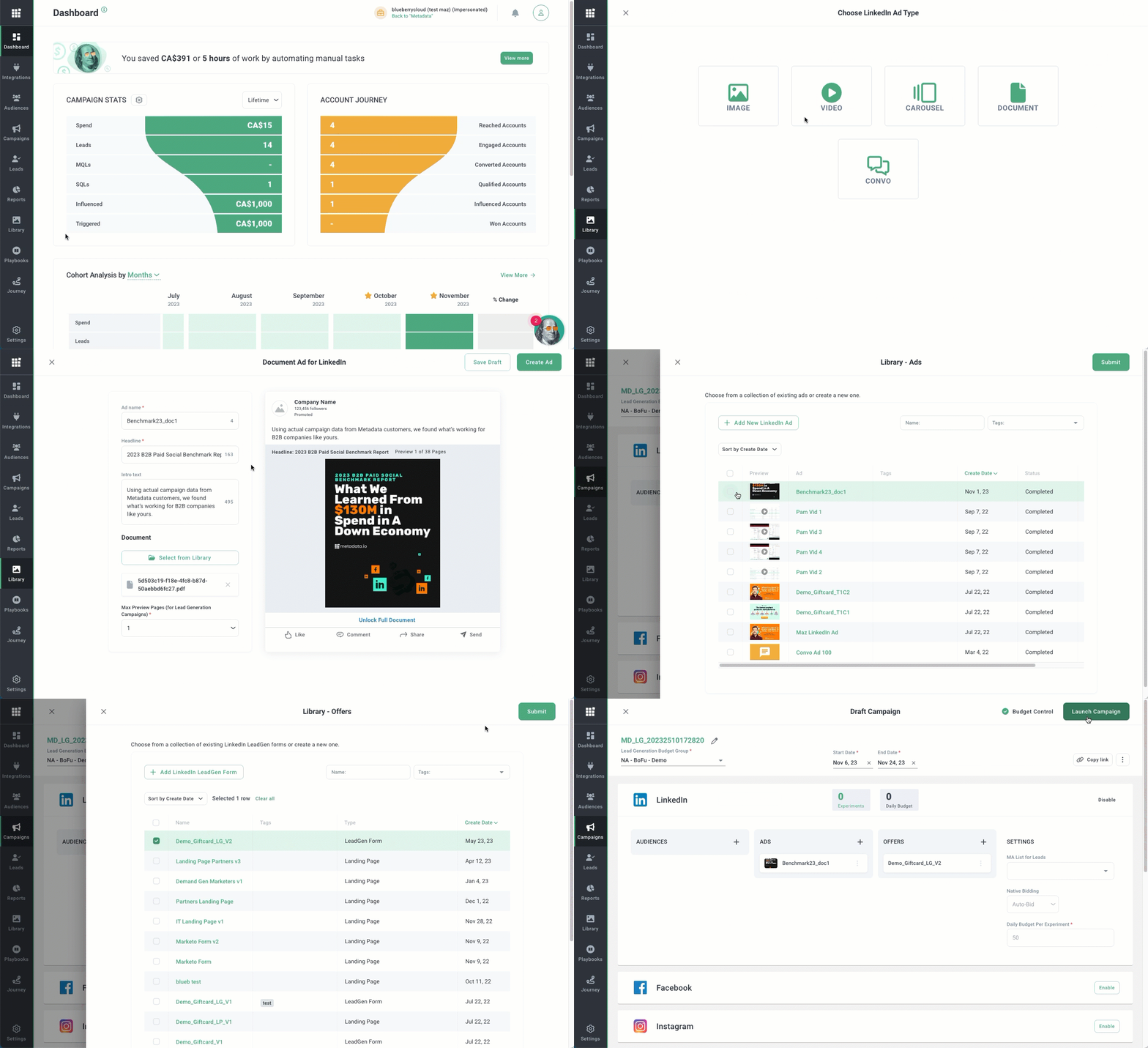
Go to Library > Ads.
Click Add New Ad > LinkedIn.
Click Document.
Enter your ad name, headline, intro text, upload your document and select the number preview pages.
Best practice: Use a naming convention that follows a format similar to Objective_Message_TextVariation_CreativeVariation (eg, Demo_Giftcard_T1C1).
Click Create Ad.
Add the document ad to your campaign.
Note:
- Supported channels: LinkedIn
- Supported offer types: Lead gen form
- Supported campaign types: Lead generation